


'Web Push Notifications for Javascript Apps Using Firebase' by sergchr javascript pushnotifications
These notifications we're used to on smartphones are available in browser environments too. Skip this part and jump directly to the solution if you know why you are here exactly. And these notifications are on the web because every spam site asks our permissions to send us their spam.
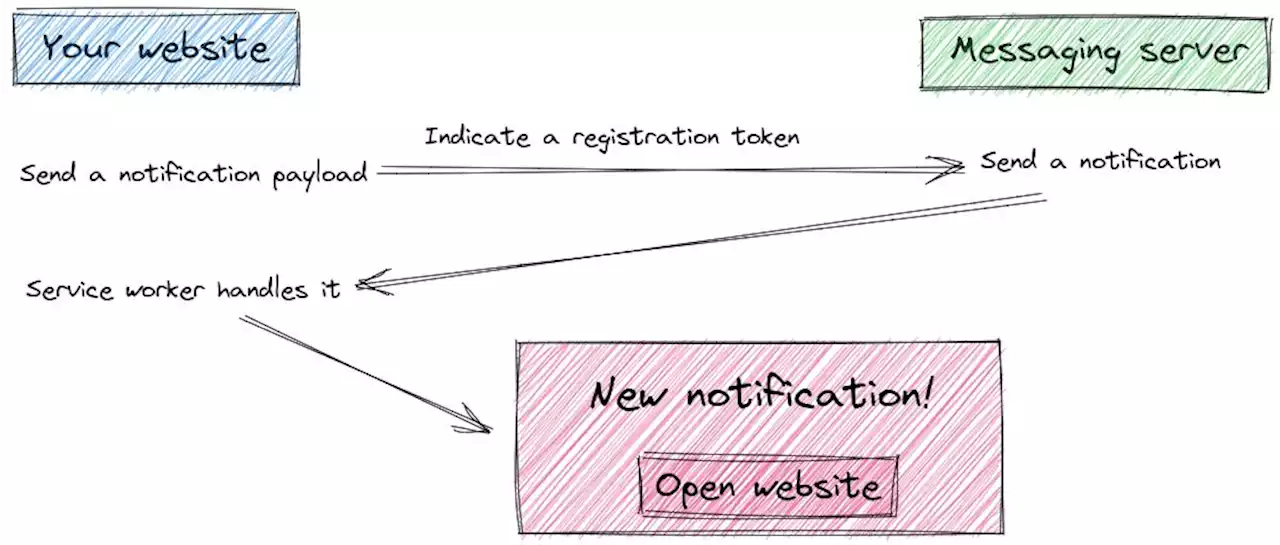
However, the technology itself is useful. I didn't implement web push notifications before. There was no such case, but recently I needed to notify my users about important information as soon as possible. Email is good, but a user should open an email client first. With notifications, you see the popup immediately. I decided to write this article because I didn't find comprehensive information about implementing browser notifications for React, Next.JS, Node apps. We'll be using Firebase for this purpose, to save time ourselves by not building solutions from scratch.So as we said, it's like those mobile notifications but used in browsers mostly for spamming. It's worth noting that you need to send them to a user if that's really what he subscribed to. Examples:important information that should be handled fast;First, you ask a user permission to show the notifications. If you get an acceptance, your website installs athat'll be handling the notifications. You also send the request to register this particular user in a messaging server. You'll be asking it to send a notification to someone. When a messaging server registers your users, it'll send you a unique for your user token that you'll be using as an addressee to send push notifications programmatically. You save the registration token from a messaging server. When you want to send a notification, you'll point out this token for the user you want to send a message to thus the messaging server understands to whom to send the notification. When a user agrees to receive notifications, your website installs a service worker. It's a background script that'll be running on the user's browser. It's programmed to handle the messages from the messaging server. When it receives one, it'll assemble a notification to show to this user.This is any server that knows how to communicate with your service worker. You can build it by yourself and code a service worker that will be managing messages from there. But we won't complicate our life, and we'll be using Firebase.If we use Firebase, we don't care about the proper messaging server setup because we got covered. What we need is to code logic to ask for the notifications permissions, install a service worker and write a logic to send notifications from our app.Front-end set up I have a Next.js app, but this algorithm covers any app written in Javascript. It's a library- and framework-independent. Install Firebase to your project so we can leverage simple functions rather than doing requests to FCM manually.Find a place where do you want to ask a user about the notification permission. For example, it can be a button that says "Subscribe to browser notifications". On this button click, you'll be calling a functionimport { initializeApp } from 'firebase/app'; import { getMessaging, getToken } from 'firebase/messaging'; // Replace these values with your project's ones // const firebaseConfig={ apiKey: 'xxxxx-xxx', authDomain: 'xxxx.firebaseapp.com', projectId: 'xxxx-xxxx', storageBucket: 'xxxx.appspot.com', messagingSenderId: '00000000', appId: '0:00000:00000000' }; export const app=initializeApp; const messaging=getMessaging; export async function getFCMToken { try { // Don't forget to paste your VAPID key here // const token=await getToken; return token; } catch { console.log; return undefined } }function. It retrieves a registration token from FCM, and. If the permissions are accepted, only then it'll communicate with FCM to register this user. Otherwise, the code throws an error, which you catch in theThen, you get an FCM token, which you'll be using to send notifications. So you need tosomewhere. Usually, you have a server where you may send the token, and it'll save it in the database for this particular user. Otherwise, you won't be able to send notifications to users. It's required to have the Firebase Admin SDK, which is available on server environments. There are some exceptions, though. In some cases, when you want only to subscribe users to your notifications like in a newsletter, you may not store the FCM tokens. Firebase has them, and you can send the notificationsfrom the Console. But it's not possible to send them automatically because you can't differentiate users.Create a file that'll be available on the root of your web app, the file namedhttps://yourwebsite.com/firebase-messaging-sw.js// It's a static script file, so it won't be covered by a module bundling system // hence, it uses "importScripts" function to load the other libs importScripts; importScripts; // Replace the values with yours const firebaseConfig={ apiKey: 'xxx', authDomain: 'xxx', projectId: 'xxx', storageBucket: 'xxx', messagingSenderId: 'xxx', appId: 'xxx' }; firebase.initializeApp; const messaging=firebase.messaging; // Not necessary, but if you want to handle clicks on notifications self.addEventListener=>{ event.notification.close const pathname=event.notification?.data?.FCM_MSG?.notification?.data?.link if return const url=new URL.href event.waitUntil .then=>{ const hadWindowToFocus=clientsArr.some=>windowClient.url===url ? , true) : false ) if self.clients .openWindow .then=>windowClient ? windowClient.focus : null ) }) ) }) That's all on the front-end side! You can test your button. It should ask your permission to send you notifications. When you allow it, you should see an FCM tokenIn my case, it's a Node.js server, and we'll be installing the SDK for it, but the general principle is the same for other languages/platforms.You also have a configuration for the backend in the Console. It differs from the client-side one because it has a private key that you need to sign your notification, which will be sent to FCM. Put thisThen you should initialize the Firebase library on a server start. I've put this logic into a separate file: import admin from 'firebase-admin'; import serviceAccount from './config/firebase.json'; export function init { admin.initializeApp, }); }I won't cover storing the FCM tokens, I'm sure you know how to do it, and it's not the purpose of this article. So, given you have an initialized Firebase on the server and you have a user's FCM token, you're ready to send push notifications to a user's browser! It looks like this: import { getMessaging } from 'firebase-admin/messaging'; // I use Typescript, you may not, but types will help you // to understand what data structures FCM expects. // It's an internal structure though, firebase-admin has // good typings in the library interface Message { title: string; body: string; requireInteraction?: boolean; link?: string; } // Use this function to send push notifications to a specific user export async function sendFCMMessage: Promise { try { const res=await getMessaging.send; return res; } catch { console.error; } } Now, here are some details on the notification payload. Firebase supports various platforms here I use theinterface BaseMessage { data?: { [key: string]: string; }; notification?: Notification; android?: AndroidConfig; webpush?: WebpushConfig; apns?: ApnsConfig; fcmOptions?: FcmOptions; }as a general-purpose one, but I had issues with clicking on notifications. A browser didn't handle clicks. Plus, there were problems with showing icons on notifications. It's better to useInside
Canada Latest News, Canada Headlines
Similar News:You can also read news stories similar to this one that we have collected from other news sources.
 Top 13 RPA Challenges and How to Overcome Them | HackerNoonRobotic process automation (RPA) projects are a challenging endeavor. According to a recent survey, 69% of RPA projects fail to take off because of their complexity. And for the lucky ones that manage to proceed to execution, up to 50% of them fail. To further complicate matters, Blueprint, an enterprise automation company, reports that 63% of business leaders are not satisfied with their RPA implementation speed. PwC’s study supports this idea. The consultancy found that conducting an RPA proof of concept or a pilot project often takes 4-6 months instead of the expected 4-6 weeks.However, if companies take on their automation projects prepared and aware of the possible RPA challenges, they can reap great rewards. Many are already benefiting from workflow automation services as the global RPA market increases in value. The Grand View Research forecasts this market to hit $13.74 billion by 2028, growing at a CAGR of 32.8% from 2020.Also, COVID-19 vastly accelerated automation, despite the pitfalls of RPA deployment. To highlight the significant role of the pandemic, Mihir Shukla, Co-founder and CEO of Automation Anywhere, gave the following example: at one point during the pandemic, a large bank was forced to update six million loan records immediately. Without RPA, such an enormous task would take two years to accomplish.So, why do RPA projects fail? And how to succeed despite the discouraging stats above?
Read more »
 Step-by-Step Guide To Web Development In 2022 | HackerNoonWith every year, more technology is developed, meaning that there are new ways to code websites. This is how to start web development in 2022 in a simple way.
Read more »
 Build a Job Application Tracker in 10 minutes Using ToolJet's Low Code Tool | HackerNoonIn this article, you'll learn to build an app that will let you manage all your job applications right from your own personal dashboard.
Read more »
 A Quick Guide to CAB(Call, Apply, Bind) in JavaScript | HackerNoonHere is the easy and simple way to understand call, apply, bind in JavaScript. With these simple examples, you'll never confuse again with these methods
Read more »